Author Archives: Sian

Android触屏事件简单处理与实现

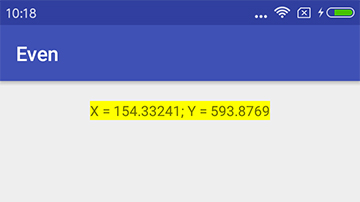
1、上图,无图无真相

2、Demo基本设计原理
2.1、监听屏幕的触摸事件,将当前事件发生的坐标打印在TextView上;
2.2、判断不同的触摸事件类型,改变TextView的背影色;
2.3、实现本身很简单,对于初学者来讲是一步积累,代码中有相对应注释说明;

3、关键代码
XML

1
2
3
4
5
6
7
8
9
10
11
12
13
14
15
16
17
<?xml version="1.0" encoding="utf-8"?>
<linearlayout xmlns:android="http://schemas.android.com/apk/res/android"
    xmlns:tools="http://schemas.android.com/tools"
    android:layout_width="match_parent"
    android:layout_height="match_parent"
    android:orientation="vertical"
    tools:context="com.yusian.even.MainActivity">
 
    <textview
        android:id="@+id/textView"
        android:layout_width="wrap_content"
        android:layout_height="wrap_content"
        android:text="Hello World!"
        android:layout_margin="20dp"
        android:layout_gravity="center_horizontal"></textview>
 
</linearlayout>

[……]

继续阅读

Android基础控件RadioGroup|Button|TextView|ImageView及事件处理综合使用

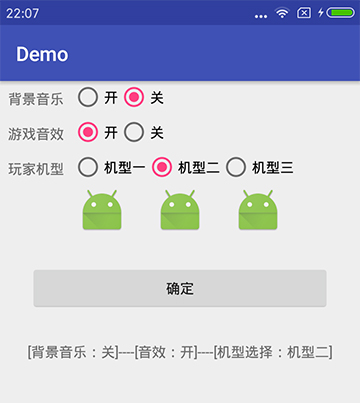
1、上图,无图无真相

2、Demo设计
2.1、模拟游戏当中的配置文件,将相关选项数据保存或打印出来;
2.2、创建三组RadioGroup、一组ImageView、一个按钮、一个用于输出的TextView;
2.3、RadioGroup与Button的事件接口由当前Activity实现;
2.4、相关方法与代码实现已都写在代码注释当中;
2.5、页面布局使用线性布局嵌套实现;

3、关键代码[……]

继续阅读

Android基础控件RadioButton的基本使用

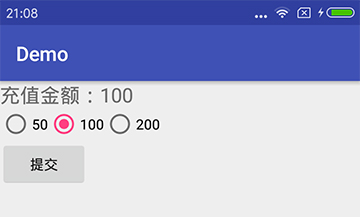
1、先上图

2、基础知识
2.1、RadioButton一般需要配合RadioGroup使用,否则Radio之间不能互斥;
2.2、RadioButton的事件一般绑定在RadioGroup接口中:RadioGroup.OnCheckedChangeListener,实现方法onCheckedChanged(RadioGroup group, @IdRes int checkedId);
2.3、RadioGroup通过getCheckedRadioButtonId()方法可获取当前被选中RadioButton的ID;

3、Demo说明
3.1、当选中RadioGroup中的某个RadioButton时,通过Log类将其id与文本输出;
3.2、当点击提交按钮时,修改TextView中的文字,与RadioButton中相关的文字关联起来;

4、关键代码[……]

继续阅读

Android基础控件CheckBox与EditText的基本使用

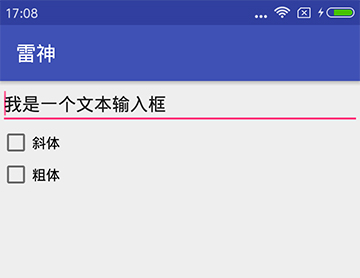
1、上图

2、Activity

1
2
3
4
5
6
7
8
9
10
11
12
13
14
15
16
17
18
19
20
21
22
23
24
25
26
27
28
29
30
31
32
33
34
35
36
37
38
39
40
41
42
43
44
45
46
package com.yusian.gamedemo;
 
import android.graphics.Typeface;
import android.support.v7.app.AppCompatActivity;
import android.os.Bundle;
import android.widget.CheckBox;
import android.widget.CompoundButton;
import android.widget.EditText;
 
public class MainActivity extends AppCompatActivity {
    private EditText editText;
    private int style = 0;      // 当前类型,全局用
    @Override
    protected void onCreate(Bundle savedInstanceState) {
        super.onCreate(savedInstanceState);
        setContentView(R.layout.activity_main);
        // 成员变量赋值
        editText = (EditText)findViewById(R.id.editText);
        // 将两个CheckBox分别绑定事件
        CheckBox box1 = (CheckBox)findViewById(R.id.checkbox1);
        box1.setOnCheckedChangeListener(new CheckBoxListener());
        CheckBox box2 = (CheckBox)findViewById(R.id.checkbox2);
        box2.setOnCheckedChangeListener(new CheckBoxListener());
    }
    // 内部类实现CheckBox的事件监听接口
    class CheckBoxListener implements CompoundButton.OnCheckedChangeListener{
        @Override
        public void onCheckedChanged(CompoundButton buttonView, boolean isChecked) {
            switch (buttonView.getId()){
                // 第一个CheckBox事件响应
                case R.id.checkbox1:{
                    // 如果isChecked为true则+ITALIC,否则-ITALIC
                    style += (isChecked ? 1 : -1) * Typeface.ITALIC;
                }break;
                // 第二个CheckBox事件响应
                case R.id.checkbox2:{
                    // 如果isChecked为true则+BOLD,否则-BOLD
                    style += (isChecked ? 1 : -1) * Typeface.BOLD;
                }break;
                default:break;
            }
            // 将style设置到EditText上
            editText.setTypeface(Typeface.DEFAULT, style);
        }
    }
}

[……]

继续阅读

Android Studio修改工程默认目录的方法

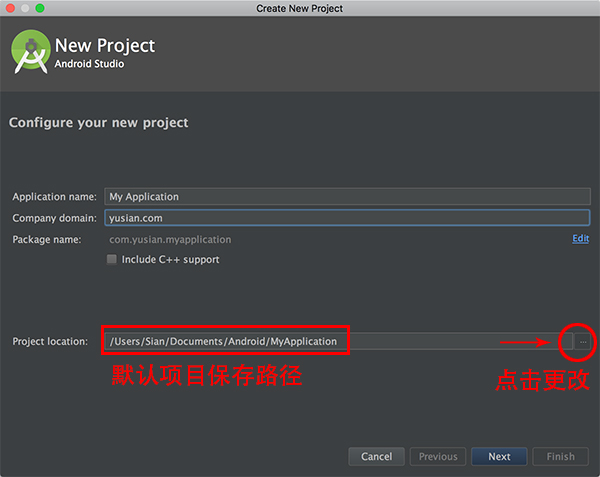
1、在新建工程时,MAC下默认目录为/Users/xxxxx/AndroidStudioProjects,如果要修改默认路径怎么办呢?

2、看图

3、修改这个路径后,创建新工程,下次会自动记住这个目录,但前提条件是,用新目录创建的工程要创建成功,否则会回到之前的状态。[……]

继续阅读