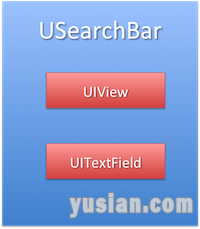
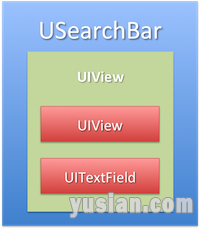
1、先看两张对比图
2、相关说明
iOS6中最底层的UIView为searchBar的基础view
上面的UIView为searchBar的背景view,TextField为文本输入控件
iOS7不同的是在子控件与基础视图中加了一层UIView
3、推荐使用
如果需要对UISearchB[……]
1、先看两张对比图
2、相关说明
iOS6中最底层的UIView为searchBar的基础view
上面的UIView为searchBar的背景view,TextField为文本输入控件
iOS7不同的是在子控件与基础视图中加了一层UIView
3、推荐使用
如果需要对UISearchB[……]
考虑到统一ios6与ios7的界面风格,UISearchBar通过重自定义来实现,重写一个类继承自UISearchBar
1、效果图:
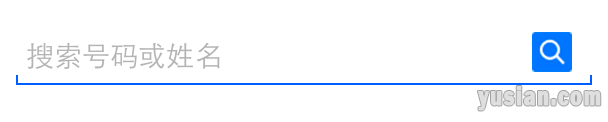
2、部分代码:
附注释说明
1 2 3 4 5 6 7 8 9 10 | SASearchBar.h #import <UIKit/UIKit.h> @interface SASearchBar : UISearchBar @property (nonatomic, strong) UITextField *textField; @property (nonatomic, strong) UIButton *searchBtn; @end |
SASearchBar.m[……]
网上搜了大半天,如出一辙的结果如下:
设置行间距和换行模式都是设置一个属性:kCTParagraphStyleAttributeName,这个属性里面又分为很多子
属性,其中就包括
kCTLineBreakByCharWrapping
kCTParagraphStyleSpecifierLineSpacingAdjustment
设置如下:
1 2 3 4 5 6 7 8 9 10 11 12 13 14 15 16 17 18 19 20 | //段落 //line break CTParagraphStyleSetting lineBreakMode; CTLineBreakMode lineBreak = kCTLineBreakByCharWrapping; //换行模式 lineBreakMode.spec = kCTParagraphStyleSpecifierLineBreakMode; lineBreakMode.value = &lineBreak; lineBreakMode.valueSize = sizeof(CTLineBreakMode); //行间距 CTParagraphStyleSetting LineSpacing; CGFloat spacing = 4.0; //指定间距 LineSpacing.spec = kCTParagraphStyleSpecifierLineSpacingAdjustment; LineSpacing.value = &spacing; LineSpacing.valueSize = sizeof(CGFloat); CTParagraphStyleSetting settings[] = {lineBreakMode,LineSpacing}; CTParagraphStyleRef paragraphStyle = CTParagraphStyleCreate(settings, 2); //第二个参数为settings的长度 [attributedString addAttribute:(NSString *)kCTParagraphStyleAttributeName value:(id)paragraphStyle range:NSMakeRange(0, attributedString.length)]; |
[……]
编译设置中,如下图所示设置
1、将Valid Architectures 中的 arm64删除
2、将Build Active Architecture Only 设置为 NO
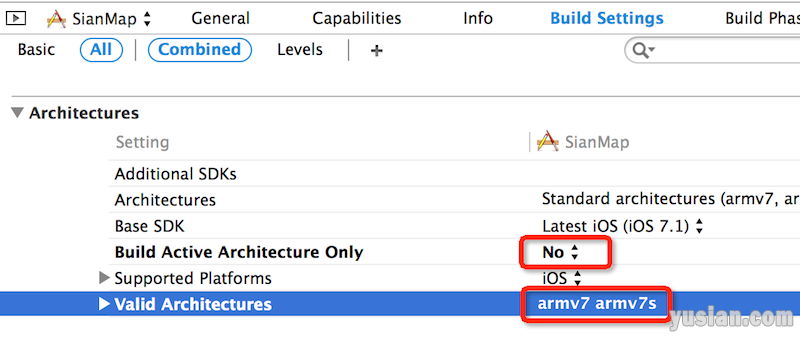
否则会报错类似如下:
Undefined symbols for architecture x86_64:
“_[……]
1 2 3 4 5 6 7 8 9 10 11 12 13 14 15 16 17 18 19 20 21 22 23 24 25 26 27 28 29 30 31 32 33 34 35 36 37 38 39 40 41 42 43 44 45 46 47 48 49 50 51 52 53 54 55 56 57 58 59 60 61 62 63 | - (void)viewDidLoad { [super viewDidLoad]; if ([[[UIDevice currentDevice] systemVersion] floatValue] < 7.0) { // 1、修改导航条样式 UINavigationBar *bar = [UINavigationBar appearance]; // 修改导航条背景 [bar setBackgroundImage:[UIImage imageNamed:@"navigationbar_background.png"] forBarMetrics:UIBarMetricsDefault]; // 修改导航条文字样式 [bar setTitleTextAttributes:@{ UITextAttributeTextColor : [UIColor blackColor], UITextAttributeTextShadowOffset : [NSValue valueWithUIOffset:UIOffsetZero] }]; // 2、修改导航条按钮样式 UIBarButtonItem *item = [UIBarButtonItem appearance]; UIImage *normal = [UIImage imageNamed:@"navigationbar_button_background.png"]; UIImage *highlight = [UIImage imageNamed:@"navigationbar_button_background_pushed.png"]; // 修改导航条按钮背景 [item setBackgroundImage:normal forState:UIControlStateNormal barMetrics:UIBarMetricsDefault]; [item setBackgroundImage:highlight forState:UIControlStateHighlighted barMetrics:UIBarMetricsDefault]; // 修改导航条按钮文字样式 [item setTitleTextAttributes:@{ UITextAttributeTextColor : kBlueColor, UITextAttributeTextShadowOffset : [NSValue valueWithUIOffset:UIOffsetZero], } forState:UIControlStateNormal]; [item setTitleTextAttributes:@{ UITextAttributeTextColor : kBlueColor, UITextAttributeTextShadowOffset : [NSValue valueWithUIOffset:UIOffsetZero] } forState:UIControlStateHighlighted]; [item setBackButtonBackgroundImage:normal forState:UIControlStateNormal barMetrics:UIBarMetricsDefault]; [item setBackButtonBackgroundImage:highlight forState:UIControlStateHighlighted barMetrics:UIBarMetricsDefault]; // 3、修改状态栏样式 [UIApplication sharedApplication].statusBarHidden = NO; [UIApplication sharedApplication].statusBarStyle = UIStatusBarStyleBlackOpaque; } } #pragma mark - 2、代理方法 #pragma mark 2.1、控制器将要视图显示 - (void)navigationController:(UINavigationController *)navigationController willShowViewController:(UIViewController *)viewController animated:(BOOL)animated { // 在未自定义导航条返回键的情况下,iOS6及以下版本设备导航条自动添加仿iOS7返回按钮(根控制器例外) if (!(viewController == navigationController.viewControllers.firstObject || [(RMBaseVCtrl *)viewController isCustomNBI]) && [viewController isKindOfClass:[RMBaseVCtrl class]]){ // 栈控制器数组 NSArray *vcs = navigationController.viewControllers; // 前一个控制器序号 int penultimate = (int)vcs.count - 2; if (penultimate >= 0) { // 前一个控制器标题[......]<p class="read-more"><a href="https://www.yusian.com/blog/project/2014/08/09/232925559.html">继续阅读</a></p> |