Author Archives: Sian

Linux下添加新硬盘并挂载使用

1、 查看新磁盘信息

1
2
3
4
5
6
7
8
9
10
11
12
13
14
15
16
17
18
[root@Crayfish ~]# fdisk -l
 
Disk /dev/xvda: 21.5 GB, 21474836480 bytes
255 heads, 63 sectors/track, 2610 cylinders
Units = cylinders of 16065 * 512 = 8225280 bytes
Sector size (logical/physical): 512 bytes / 512 bytes
I/O size (minimum/optimal): 512 bytes / 512 bytes
Disk identifier: 0x00060953
 
    Device Boot      Start         End      Blocks   Id  System
/dev/xvda1   *           1        2611    20970496   83  Linux
 
Disk /dev/xvdb: 21.5 GB, 21474836480 bytes
255 heads, 63 sectors/track, 2610 cylinders
Units = cylinders of 16065 * 512 = 8225280 bytes
Sector size (logical/physical): 512 bytes / 512 bytes
I/O size (minimum/optimal): 512 bytes / 512 bytes
Disk identifier: 0x00000000

2、硬盘分区

2.1、进入fdisk模式

1
2
3
4
5
6
7
8
9
10
11
[root@Crayfish ~]# fdisk /dev/xvdb
Device contains neither a valid DOS partition table, nor Sun, SGI or OSF disklabel
Building a new DOS disklabel with disk identifier 0xc233737d.
Changes will remain in memory only, until you decide to write them.
After that, of course, the previous content won't be recoverable.
 
Warning: invalid flag 0x0000 of partition table 4 will be corrected by w(rite)
 
WARNING: DOS-compatible mode is deprecated. It's strongly recommended to
         switch off the mode (command 'c') and change display units to
         sectors (command 'u').

2.2、输入n进行分区
[……]

继续阅读

关于字符串显示长度sizeWithFont要说几句

1、在iOS7之前,动态布局场景中,由于初始化UILable的大小与实际需要显示的文字内容有时候会冲突,简单一点讲UILable初始时设小了,文字过多显示不完,或者初始设置太大了,文字较少,显示效果过于空荡。

2、如何解决这个问题呢,一般需要用到NSString的两个相关方法:

– (CGSize)sizeWithFont:(UIFont *)font

– (CGSize)sizeWithFont:(UIFont *)font constrainedToSize:(CGSize)size

3、这两个方法相信很多人都不陌生,但在iOS7之后此类方法都已过期,官方不推荐使用,取而代之的对应两个方法为:

– (CGSize)sizeWithAttributes:(NSDictionary *)attrs

– (CGRect)boundingRectWithSize:(CGSize)size options:(NSStringDrawingOptions)options attributes:(NSDictionary *)attributes context:(NSStringDrawingContext *)context[……]

继续阅读

常用的SQL语句

1、连接Mysql

1
mysql -h主机地址 -u用户名 -p用户密码

2、修改密码

1
mysqladmin -u用户名 -p旧密码 password 新密码

3、增加新用户

1
grant select on 数据库.* to 用户名@登录主机 identified by “密码”

4、创建数据库

注意:创建数据库之前要先连接Mysql服务器

1
create database <数据库名>

例1:建立一个名为xhkdb的数据库

1
mysql> create database xhkdb;

例2:创建数据库并分配用户

1
2
3
4
5
CREATE DATABASE 数据库名;
 
②GRANT SELECT,INSERT,UPDATE,DELETE,CREATE,DROP,ALTER ON 数据库名.* TO 数据库名@localhost IDENTIFIED BY '密码';
 
③SET PASSWORD FOR '数据库名'@'localhost' = OLD_PASSWORD('密码');

依次执行3个命令完成数据库创建。注意:中文 “密码”和“数据库”是户自己需要设置的。

5、显示数据库[……]

继续阅读

如何让iOS项目支持中文(控件显示中文)

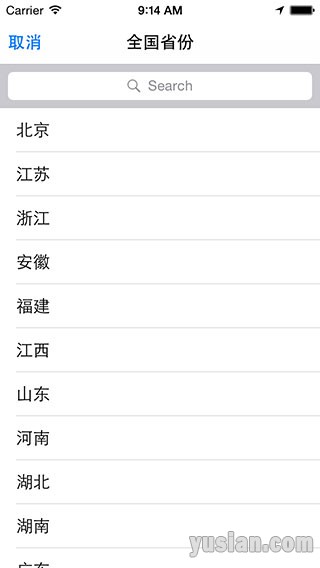
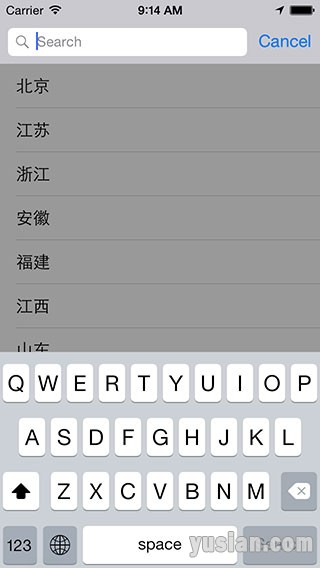
1、在项目开发中,有些系统自带的控件(如:拍照、搜索等)上带有Lable或Button,然而默认情况下显示的都中英文,如下所示:

iOS-Simulator-Screen-Shot-2015年6月11日-上午9.14.53iOS-Simulator-Screen-Shot-2015年6月11日-上午9.14.55

2、将本地语言换成中文结果还是显示英文,这是如何?有些同志们通过各种subViews及superView加for循环加kindOfClass等一系统方式方法找到该文[……]

继续阅读

如何解决百度地图反地理编码失败的问题!!

我们在使用百度地图定位成功后,一般会使用反地理编码的方式进行地址解析,获取地址信息供我们应用使用,如下方法所示:

1
2
3
4
5
6
7
8
9
10
11
12
13
14
15
16
17
18
19
20
21
22
23
24
25
26
27
// 获取地址位置后调用方法
- (void)didUpdateBMKUserLocation:(BMKUserLocation *)userLocation
{
/*
????code for location...
?*/
????????// 反地址编码获取地址
????????BMKReverseGeoCodeOption *option = [[BMKReverseGeoCodeOption alloc] init];
????????option.reverseGeoPoint = userLocation.location.coordinate;
?????????
????????SALog(@"开始反地理编码...");
?????????
????????if (![self.geoCode reverseGeoCode:option]){
????????????SALog(@"反地址编码失败,使用Apple地图反地理编码");
????????????CLLocationCoordinate2D newCoor = [[self class] GCJ02FromBD09:userLocation.location.coordinate];
????????????CLLocation *location = [[CLLocation alloc] initWithLatitude:newCoor.latitude longitude:newCoor.longitude];
????????????[[[CLGeocoder alloc] init] reverseGeocodeLocation:location completionHandler:^(NSArray *placemarks, NSError *error) {
????????????????CLPlacemark *placemark = [placemarks firstObject];
????????????????SALog(@"%@ - %@", placemark.name, placemark.locality);
/*
????code for address...
?*/
????????????}];
????????}
????????// 结束
????}
}

[……]

继续阅读